PUBLIC WORK / 2026
HA Blast Radius
Check dependencies before you make a change. Blast Radius inspects the Home Assistant configuration around an entity and shows what may be affected before you rename or remove it.
PROBLEM
Configuration changes have a blast radius.
A Home Assistant entity can be referenced by an automation trigger, targeted by a script, included in a scene or group, displayed on a dashboard and embedded inside a Jinja template. Renaming or removing it without seeing those references first can leave behind failures that only appear later.
Home Assistant exposes the individual pieces, but it does not give you one read-only dependency view that starts with an entity and answers: what configuration depends on this?
WHAT IT SEES
Loaded configuration, with the reference location preserved.
Blast Radius inspects loaded automations and scripts, scene and exposed group membership, configured Lovelace dashboards and common entity references. A result is not just “related to automation X”: it carries the source, the role of the reference and the exact configuration path where possible.
Jinja is parsed rather than executed. Literal entity IDs can be surfaced, while dynamic expressions remain explicitly unresolved. Device, area, floor and label selectors can be identified through Home Assistant registries without pretending that every selector can be expanded into a definitive runtime entity list.
Loaded blueprints are inspected after Home Assistant substitutes their inputs. Real traversal truncation is called out as incomplete. Ordinary static-analysis limits stay separate: unresolved expressions related to the selected entity remain in Impact, while device/selector context and system-wide dashboard diagnostics live under Coverage & diagnostics.
WORKFLOW
Search, inspect, preview, then make the change yourself.
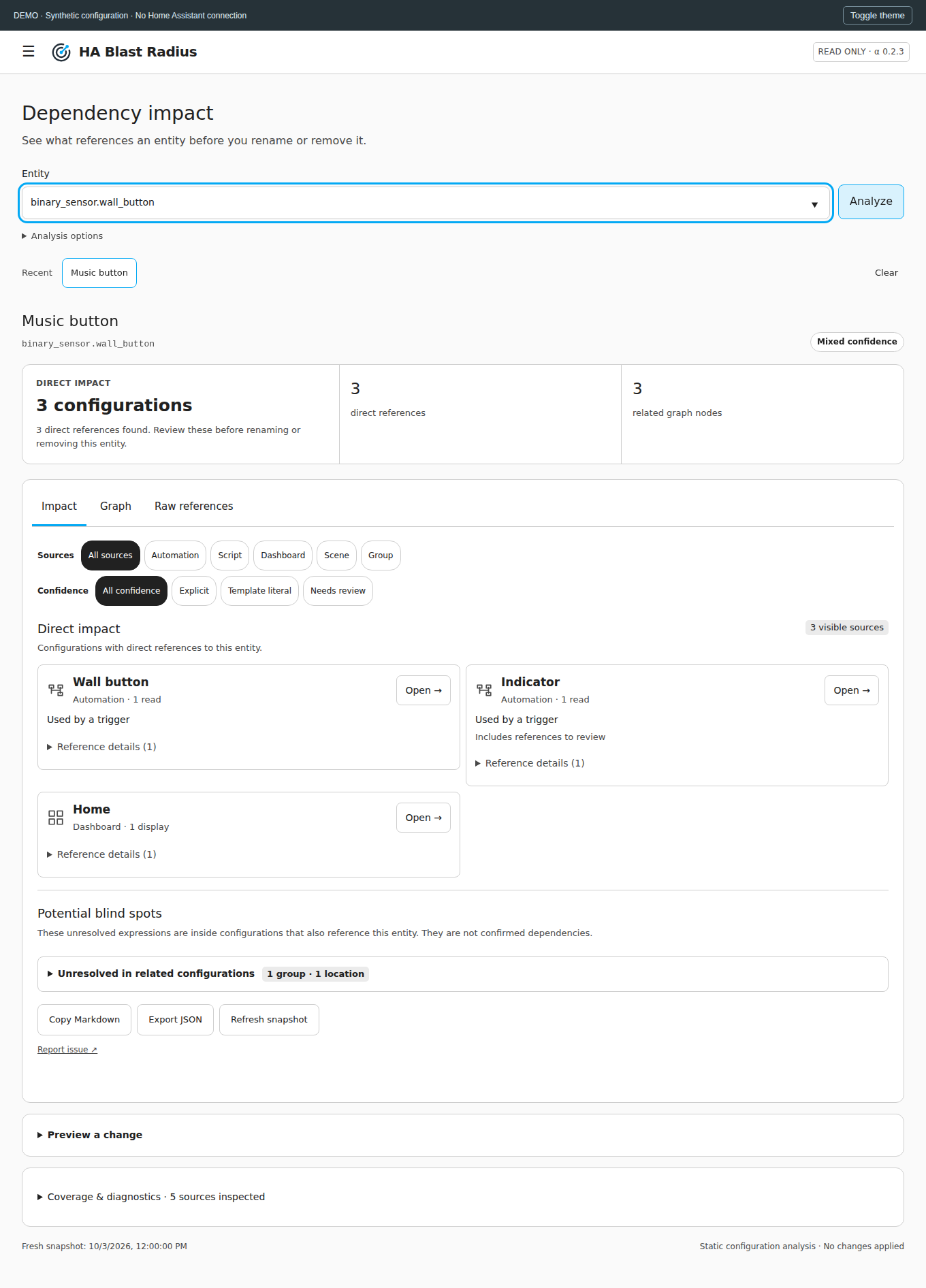
Select an entity and Blast Radius builds a bounded dependency graph. The Impact view opens with a factual summary of direct references, linked configurations and related graph nodes rather than a synthetic severity score. Graph exposes the structural relationships andRaw references keeps the underlying evidence visible.
From a result you can open the corresponding automation, script, scene, dashboard or entity in Home Assistant, or make a graph node the new analysis root. Recent searches and the last successful view are retained for the current browser session, while traversal depth stays available under compact Analysis options instead of crowding the default view.
Rename and removal previews show what the static model would be affected by, but the integration never performs the mutation. Reports can be copied as Markdown or exported as JSON for review.
INTERFACE
The impact-first panel keeps direct references and coverage limits separate.
BOUNDARY
Static analysis is useful because its limits are visible.
Blast Radius does not simulate which conditional branch will run tonight, evaluate runtime variables, inspect Node-RED or AppDaemon, or claim that a zero-reference report proves a removal is safe. It models configuration dependencies, not runtime causality.
Home Assistant integration points can be version-sensitive, so tested baselines and compatibility notes stay with the versioned project documentation instead of being implied by the portfolio page.
RELATED WORK
Runtime evidence picks up where static configuration analysis stops.
HA Forensic Lab
Runtime forensics and incident reconstruction for investigating what happened after the system was running.
PROJECT LINKS
Install it, inspect the architecture, or read the source.
This page stays at the product and design level. Installation, compatibility, architecture, API behaviour and development details live with the repository so they stay versioned with the code.